How to disable user registration in WordPress
Published View as Markdown
Disable user registration in WordPress: untick Anyone can register under Settings → General, or use a switch that holds it off. Plus how to check it worked.
With registration open, anyone can create an account on your site at wp-login.php?action=register. Bots know that address. If nobody but you and your team needs to log in, close it.
Here is how to disable user registration in WordPress, how to check it worked, and how to keep it off.
Close registration in Settings → General
- Go to Settings → General.
- Next to Membership, untick Anyone can register.
- Click Save Changes.
Or with WP-CLI:
wp option update users_can_register 0On a multisite network the Membership row isn’t there. The setting is Allow new registrations, under Registration Settings in Network Admin → Settings. The rest of this guide is for single sites.
Check that it worked
Log out, or use a private window, and open /wp-login.php?action=register.
WordPress sends you to wp-login.php?registration=disabled, and the login screen says:
Error: User registration is currently not allowed.The Register link under the login form is gone too. From WP-CLI, wp option get users_can_register prints 0.
A sign-up form somewhere else on the site, such as a store’s account page, comes from another plugin. Look in that plugin’s settings.
Keep registration off with a switch
The Membership checkbox is one row in the database. Any administrator can tick it again, and so can anything able to write to the database.
Adminkeep is a free plugin of small features with one switch each. One of them holds registration off, whatever that row says.
- Go to Settings → Adminkeep.
- Switch on Registration Lockdown.
From WP-CLI:
wp adminkeep feature enable registration_lock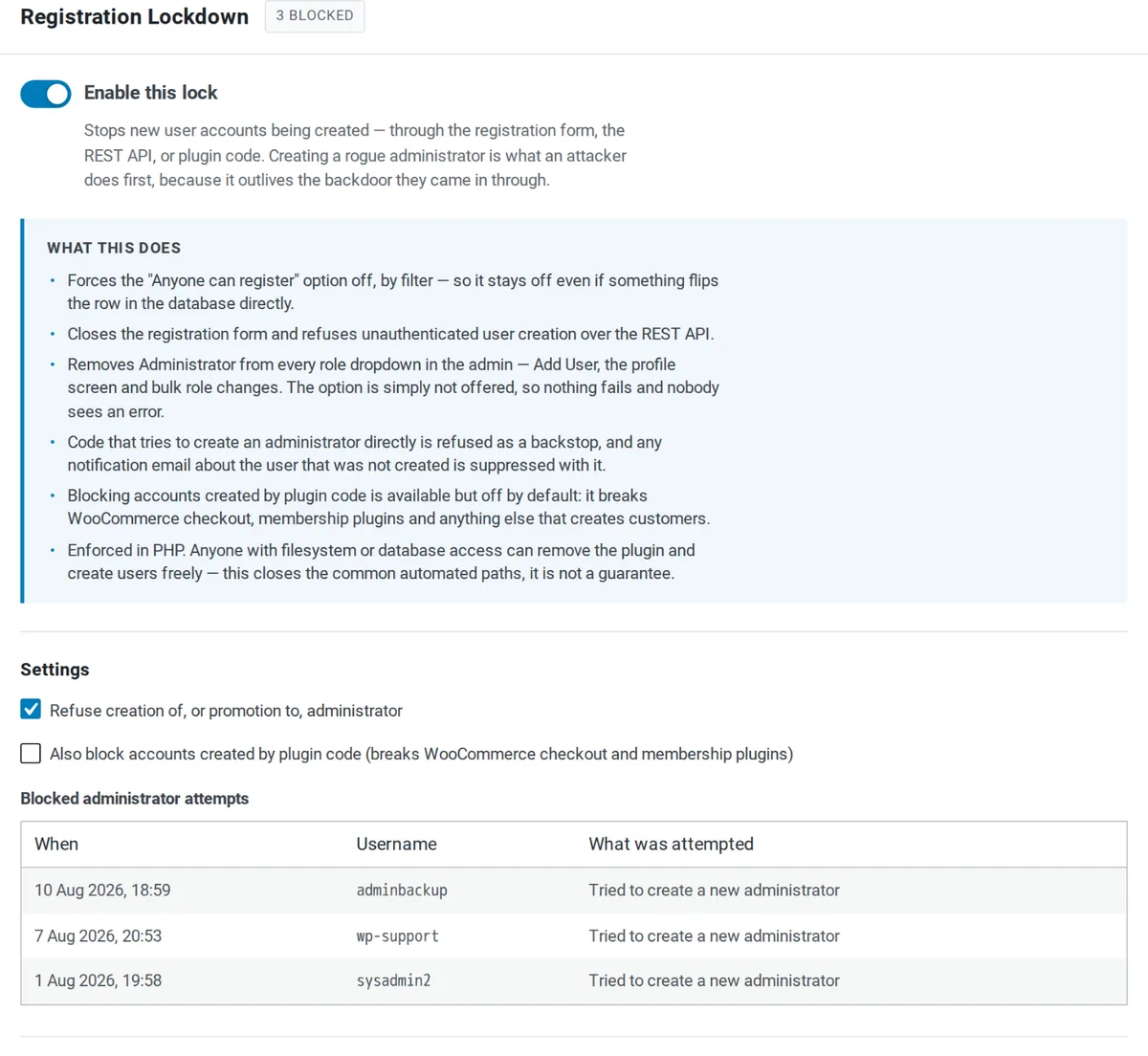
While the switch is on:
- Anyone can register reads as off. WordPress gets the answer from a filter, so the checkbox shows unticked even if the database row is changed.
- The registration form answers 403.
/wp-login.php?action=registershows “Registration is closed.” - Sign-ups over the REST API are refused, unless the request comes from a logged-in user who is allowed to create users.
- New administrators are refused. This setting is on by default: the Administrator role is left out of the role dropdowns, and code that tries to create an administrator is refused and logged. Turn it off in the same panel when you need to add one.
Switch it off and the checkbox goes back to whatever the database says. The configuration docs list every setting.
What it does not do
- Existing accounts stay. Delete the ones you don’t want under Users. Sorting by registration date shows a wave of sign-ups at a glance.
- You can still add people. Users → Add User still works.
- Plugins create accounts their own way. WooCommerce checkout and membership plugins don’t read the Membership setting. How to stop spam user registrations covers those.
- Bots keep asking.
wp-login.php?action=registerwill still show up in your logs. The requests create nothing.
If an administrator you didn’t create is already in the list, read WordPress hacked: admin users added first.
Questions people ask
How do I disable user registration in WordPress?
Go to Settings → General, untick Anyone can register next to Membership, and save. From WP-CLI, run wp option update users_can_register 0. The registration form at wp-login.php?action=register stops working straight away.
What does wp-login.php?registration=disabled mean?
It is where WordPress sends anyone who opens the registration form while registration is off. The login screen there says "User registration is currently not allowed." Seeing it means the setting is working.
Does disabling registration delete existing users?
No. It only stops new sign-ups through the registration form. Every existing account stays and can still log in. Remove the ones you don't want under Users.
Why does my site still get new users after I disabled registration?
The setting only closes WordPress's own registration form. WooCommerce checkout, membership plugins and other plugin code create accounts their own way and don't read it.