---
title: "Contact Form"
description: "How Adminkeep's Contact Form works: block and shortcode, Send to, a WordPress nonce or Turnstile and reCAPTCHA v3 keys, page caching and WP-CLI."
source: https://adminkeep.com/docs/contact-form/
---
Contact Form adds one fixed form to your site: Name, Email and Message. Each message is emailed
to you and nothing is stored. It works as soon as you switch it on, protected by a WordPress
nonce, and you can choose Cloudflare Turnstile or Google reCAPTCHA v3 instead. It has no other
fields, no builder and no entries screen. It was added in 2.3.0; the WordPress nonce arrived in
2.4.0. This page is the reference; the [step-by-step guide](/guides/wordpress-contact-form-turnstile/)
walks through setting it up with Turnstile.
## Turn it on
Go to **Settings → Adminkeep** and switch on **Contact Form**, in the **Email** group. That adds
**Settings → Contact Form**. The screen exists only while the feature is on.
**The form works straight away.** Its spam protection starts as **WordPress Nonce**, which needs
no keys and no outside service. Place the form on a page and it is live. If your site caches its
pages, switch to Turnstile or reCAPTCHA first: see [Page caching](#page-caching).
**The form is hidden only while a provider's keys are missing.** If you choose Cloudflare
Turnstile or Google reCAPTCHA v3 and have not saved both of its keys, visitors see nothing where
the form would be. Administrators see a short note there, linked to the settings screen. The note
is never shown to visitors, and page caches do not store it, because they skip logged-in users.
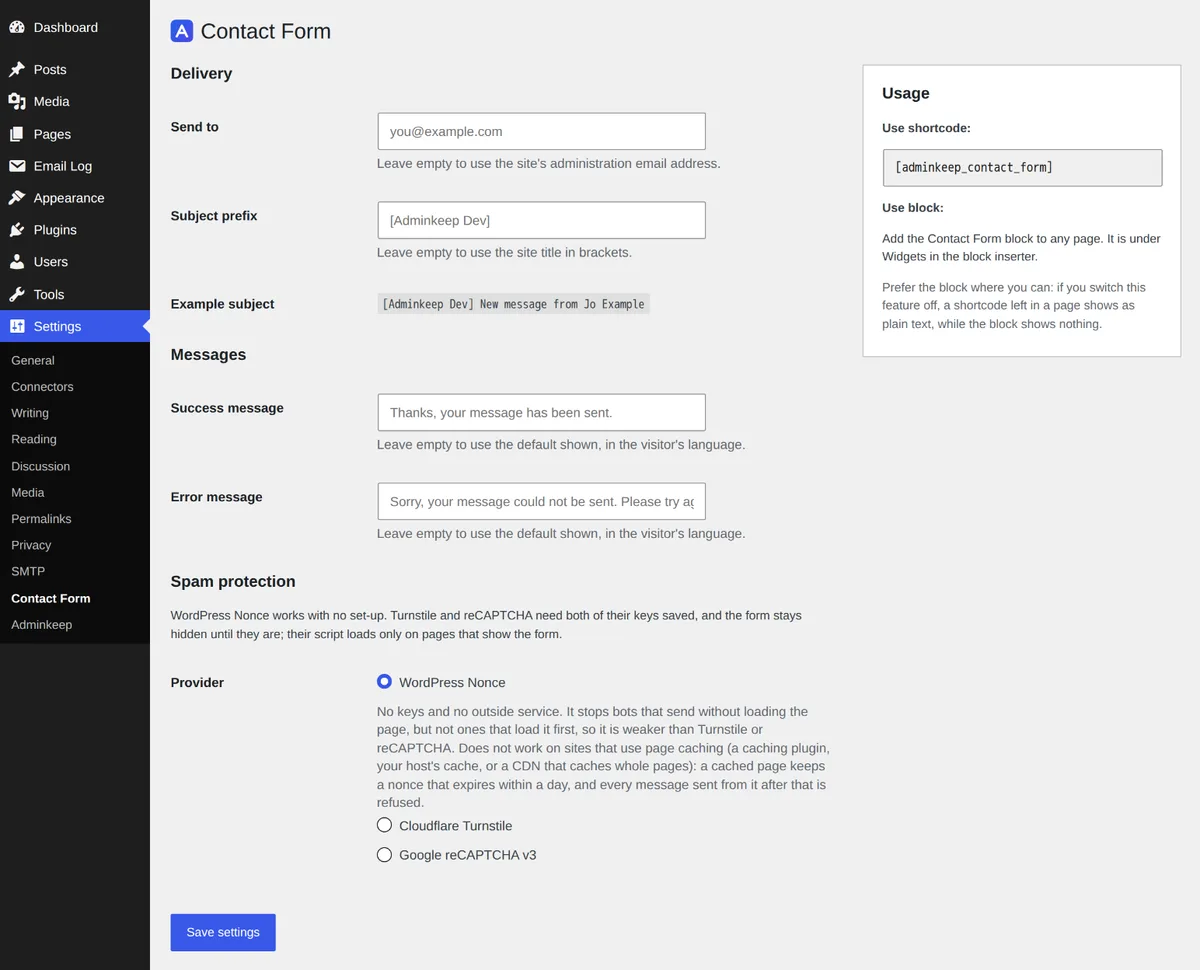
Settings → Contact Form: WordPress Nonce, the default, with the Usage box on the right.
### Upgrading from 2.3.0
In 2.3.0 the form stayed hidden until Turnstile or reCAPTCHA was set up. On a site that had the
feature on but never saved any keys, 2.4.0 shows the form, protected by the nonce, wherever its
block or shortcode already sits. Sites that had set up Turnstile or reCAPTCHA keep it.
## Placing the form
The **Usage** box on the right of **Settings → Contact Form** shows both ways:
- **The block.** Add the **Contact Form** block to any page or post. It is under **Widgets** in
the block inserter. In the editor it shows a placeholder, not a live form, so the editor never
loads the spam check.
- **The shortcode.** Where blocks are not available, such as the classic editor or a text
widget, use `[adminkeep_contact_form]`. The Usage box shows it in a read-only field, ready to
copy.
Prefer the block. If you switch Contact Form off later, a shortcode left in a page shows as plain
text, because the shortcode no longer exists. A block just shows nothing.
You can put the form on more than one page, or twice on the same page. Each form works on its own.
## Settings
Everything is on **Settings → Contact Form**.
- **Warnings at the top.** When the form is hidden, a warning says why: "The form is hidden: save
both keys for Cloudflare Turnstile, or choose WordPress Nonce." If the last message failed to
send, a second notice says so and names the cause. See
[Last submission failed](#last-submission-failed). While the form is live there is no status
line: the provider chosen below says what protects it.
- **Send to.** Where messages are emailed. Empty means the site's admin email, shown as the
placeholder.
- **Subject prefix.** The start of every subject line. Empty means your site title in brackets,
such as `[Example Site]`. The subject reads `[Example Site] New message from Jo Example`, and
the screen shows an example line as you set it.
- **Success message** and **Error message.** What the visitor reads after Send. One line each.
Empty means the built-in text: "Thanks, your message has been sent." and "Sorry, your message
could not be sent. Please try again later."
- **Spam protection.** The provider, and for Turnstile and reCAPTCHA its keys. See below.
- **Usage.** The side box with the shortcode and the block. See [Placing the form](#placing-the-form).
On **Settings → Adminkeep**, the feature's state reads **Live, protected by** the provider,
**Not set up** while the form is hidden, or **Last submission failed**.
### Spam protection
There are three choices. Only one is in force at a time.
- **WordPress Nonce**, the default. No keys and no outside service. Does not work on a site that
caches its pages.
- **Cloudflare Turnstile.** A site key and a secret key from a free Cloudflare account. Works on
cached pages.
- **Google reCAPTCHA v3.** A site key and a secret key from Google. Works on cached pages.
**WordPress Nonce.** A nonce is a code WordPress mints into the form and checks when it is sent.
It needs no keys and sends nothing to anyone. It stops bots that post to the form without loading
the page, which is most of them, but not bots that load the page first, so it is weaker than
Turnstile or reCAPTCHA. It also does not work on sites that cache their pages: see
[Page caching](#page-caching).
**Cloudflare Turnstile** and **Google reCAPTCHA v3** each need a free account with the provider
and two keys. Each provider keeps its own keys, and switching between them keeps the other's.
Switching provider also clears the last recorded failure, since it belonged to the old one.
| Field | What it holds |
|---|---|
| **Site key** | The public key. It is in the page's HTML anyway, so it is shown as plain text. |
| **Secret key** | The private key. Stored encrypted and never shown again once saved. |
| **Score threshold** | reCAPTCHA v3 only. 0.1 to 0.9, default 0.5. |
**Secret key.** After saving, the field shows a row of dots and is disabled. Press **Remove secret
key** to type a different one, or to remove it. If your site's security keys in `wp-config.php`
change, the saved secret can no longer be read; the screen says so, and you enter it again.
**Score threshold.** Google gives each visit a score from 0.0 (likely a bot) to 1.0 (likely a
person). Messages scoring below the threshold are refused. 0.5 suits most sites. Raise it if spam
gets through; lower it if real people are turned away. There is no 0.0, since that would accept
every visit.
Where to get the keys, and what to set for each provider, is in the
[guide](/guides/wordpress-contact-form-turnstile/).
To take the form down, remove its block or shortcode, or switch the feature off. There is no
"None" choice since 2.4.0.
## Keys in wp-config.php
Each key can be defined as a constant in `wp-config.php` instead of being saved in the database:
```php
define( 'ADMINKEEP_TURNSTILE_SITE_KEY', 'XXXX' );
define( 'ADMINKEEP_TURNSTILE_SECRET', 'XXXX' );
define( 'ADMINKEEP_RECAPTCHA_SITE_KEY', 'XXXX' );
define( 'ADMINKEEP_RECAPTCHA_SECRET', 'XXXX' );
```
| Constant | Holds |
|---|---|
| `ADMINKEEP_TURNSTILE_SITE_KEY` | Turnstile site key |
| `ADMINKEEP_TURNSTILE_SECRET` | Turnstile secret key |
| `ADMINKEEP_RECAPTCHA_SITE_KEY` | reCAPTCHA v3 site key |
| `ADMINKEEP_RECAPTCHA_SECRET` | reCAPTCHA v3 secret key |
Put them above the line that reads `/* That's all, stop editing! */`. A constant wins over the
saved value, field by field. A value set there is not saved to the database, and the screen locks
that field with "Set in wp-config.php" and does not display it. Because the secret never enters
the database, it is in no database backup or export. The names are not tied to this feature, so
a later feature can share the same keys.
## What the visitor sees
- **The form.** Name, Email and Message, and a Send button. The browser catches empty fields and
a badly typed address first.
- **WordPress Nonce.** Nothing extra. The nonce is already in the form.
- **Turnstile.** Cloudflare's widget sits above the button and usually passes by itself.
- **reCAPTCHA v3.** Nothing to click. Google's badge shows in the corner, as Google's terms
require.
- **On Send.** The button reads "Sending…" while the request runs. The success or error message
appears under the form. On success the fields are cleared; on an error what the visitor typed is
kept, and a field that was refused is marked.
- **Without JavaScript.** The form needs JavaScript, and says so. Send stays off until the
script has started.
The form's own CSS and JavaScript are printed with the form, on the pages that show it. Nothing
extra loads on other pages, which suits sites built with page builders. The CSS lays the fields
out and, since 2.4.0, gives them a plain look of their own: a thin border, some padding, and the
theme's font and text colour. That matters on themes that do not style form fields, such as
Twenty Twenty-Five, where the browser's own fields are a thin line. A theme that styles its
inputs still wins, and so does your [Custom CSS](/docs/custom-css/), because Adminkeep's rules
carry no weight against them.
## Where messages go
Each message is emailed to the **Send to** address through WordPress's own mailer, so the
[SMTP feature](/docs/configuration/#smtp), or whichever mail plugin you use, delivers it.
- **Subject:** the prefix, then "New message from" and the visitor's name.
- **Reply-To:** the visitor, so Reply in your mail app answers them.
- **From:** left as your site's From address. Sending "from" the visitor would fail the
authentication checks that receiving mail servers make.
- **Body:** plain text. Name, then Email, a blank line, and the message, then a line saying which
page of your site it was sent from.
**The "Sent from" line.** A published, public post or page is named with its address, such as
"Sent from Contact (https://example.com/contact/)". Any other page of the site, such as a
category archive, an author page or the blog home, is given as its address alone, without the
query string or anything after a `#`, so search words and tracking tags stay out of your inbox.
The line is left out when the address is not on your site, or when it points to a draft or a
private page, since the visitor's browser reports the address and a draft's title should not be
mailed out on its say-so.
**Nothing is stored.** There is no entries table and no screen of messages. With
[Nice Default Emails](/docs/nice-default-emails/) switched on, the notification goes out in its
HTML layout too.
If [Email Log](/docs/email-log/) is on, it keeps a copy of every message with its status, for
the retention period you set. A message that the mail server refused is listed as Failed with the
server's error. That is the way to tell whether a message you never received was sent at all.
Email Log's personal-data exporter and eraser match the visitor's address in Reply-To, so a
visitor's data request finds these emails.
## Page caching
**On a site that caches its pages, choose Cloudflare Turnstile or Google reCAPTCHA v3.** That
means a caching plugin, your host's own cache, or a CDN that caches whole pages.
The WordPress nonce expires within a day (12 to 24 hours). A cached page keeps the nonce it was
built with, so once the page is older than that, every message sent from it is refused, and the
visitor reads "This page has expired. Please reload it and send your message again." The settings
screen says the same under WordPress Nonce.
Since 2.5.0 the settings screen also warns when a page cache looks active while WordPress Nonce
is chosen: `WP_CACHE` is on, or one of WP Rocket, W3 Total Cache, WP Super Cache, LiteSpeed Cache,
WP Fastest Cache, Cache Enabler, SiteGround Speed Optimizer, Breeze, Hummingbird, Comet Cache or
Swift Performance is active. The feature's state on the Adminkeep settings panel and in
`wp adminkeep feature list` then reads "Live, page cache detected". The check is local and makes
no request, and it cannot see a host-level cache or a CDN. The
`adminkeep_contact_form_page_cache_detected` filter receives the result and the cache's name:
return `false` to silence it on a cache that leaves the contact page out, or `true` to get the
warning on a site whose cache the plugin cannot see.
With Turnstile or reCAPTCHA the form carries no nonce, so a cached copy never goes stale. The
spam check is what guards the form: each token is single-use, lasts a few minutes, and is checked
with the provider from your server on every send. The message goes out through a REST request
that is not cached.
## Last submission failed
If a visitor's message could not be sent for a reason on your side, Adminkeep records the cause,
and the feature's state reads **Last submission failed**. The notice on the settings screen says
which:
- **The provider rejected the secret key.** Turnstile or reCAPTCHA only. The secret is wrong, or
belongs to a different widget. Every visitor is turned away until you fix it.
- **The provider could not be reached.** Turnstile or reCAPTCHA only. Your server could not
contact Cloudflare or Google to check the message, so the message was refused.
- **The email could not be sent.** The mail server refused it. With SMTP or Email Log on, their
screens show the server's own error.
Only a code is recorded, never a visitor's name, address or message. The next message that goes
through clears it, and so does saving a different provider. A visitor who fails the spam check
does not trigger it, and neither does an expired nonce: that is spam traffic or a stale page, not
a fault in your setup.
## WP-CLI
```bash
wp adminkeep feature enable contact_form
wp adminkeep contact-form get
wp adminkeep contact-form set --provider=turnstile --turnstile-site-key=XXXX
printf %s "$TURNSTILE_SECRET" | wp adminkeep contact-form set --turnstile-secret-stdin
wp adminkeep contact-form set --provider=nonce
wp adminkeep contact-form set --to=hello@example.com --subject-prefix="[Example]"
```
`contact-form get` prints one row per setting: its value and where it comes from (`constant`,
`stored` or `default`). Secrets show only `(set)`, `(not set)` or `(unreadable)`. An empty Send to
shows the admin email it resolves to. The last row is the status: `live (nonce)`,
`live (turnstile)`, or `hidden: turnstile keys not set`. It takes `--format=`.
`contact-form set` changes only what you name.
| Flag | Meaning |
|---|---|
| `--provider=` | `nonce` (the default), `turnstile` or `recaptcha` |
| `--to=` | Where messages go. An empty value means the admin email |
| `--subject-prefix=` | Start of the subject line. Empty means the site title in brackets |
| `--success-text=` | The success message. Empty means the built-in text |
| `--error-text=` | The error message. Empty means the built-in text |
| `--turnstile-site-key=` | Turnstile site key |
| `--turnstile-secret-stdin` | Read the Turnstile secret from standard input |
| `--turnstile-secret=` | The secret, in plain sight. Prefer `--turnstile-secret-stdin` |
| `--clear-turnstile-secret` | Remove the saved Turnstile secret |
| `--recaptcha-site-key=` | reCAPTCHA v3 site key |
| `--recaptcha-secret-stdin`, `--recaptcha-secret=`, `--clear-recaptcha-secret` | The same three for reCAPTCHA |
| `--recaptcha-threshold=` | 0.1 to 0.9 |
The command refuses rather than guesses: a field held by a `wp-config.php` constant, two secret
flags for one provider, a bad email address, a threshold out of range or an unknown provider
(`none` included, since 2.4.0) all exit with an error and change nothing. When the feature is off,
it reminds you to run `wp adminkeep feature enable contact_form`. The secret is never printed by
any command. Full reference: [WP-CLI commands](/docs/wp-cli/#contact-form).
## Privacy
With **WordPress Nonce**, the form involves no other company: the nonce is made and checked on
your own site, and nothing is sent anywhere.
Turnstile and reCAPTCHA are the one part of Adminkeep that involves another company, and only
once you choose one. On a page that shows the form, the provider's script loads in the visitor's
browser and receives their IP address and browser details. When a visitor sends a message, your
site checks the token with the same provider, from your server. Nothing goes to us. The provider
is Cloudflare ([privacy policy](https://www.cloudflare.com/privacypolicy/)) or Google ([privacy
policy](https://policies.google.com/privacy)), whichever you chose.
With the feature on, **Settings → Privacy** offers suggested text for your own privacy policy.
While WordPress Nonce is chosen, it leaves out the paragraph about Cloudflare and Google. The
plugin's own [privacy page](/privacy/) says the same.
## Switching off and deleting
Switching Contact Form off removes the form, the block, the shortcode and the settings screen.
Your settings are kept, and deleting the plugin keeps them too unless **Delete all Adminkeep data
when the plugin is deleted** is on (see [Uninstalling](/docs/installation/#uninstalling)).